Best Antique Identifier App: Five Apps Checked Side by Side
Updated November 9, 2026 · 9-minute read
The best antique identifier app for checking a price yourself is one that shows the listings behind its estimate, like Curio or Antique Snap. To try before you pay, Antique Snap gives you three full identifications free and Curio lets you try your first scans. Resellers happy to subscribe from the start should look at Relic.
AntiqSnap (a different app from ours, despite the name) is a good start for beginners who like short articles next to their scans. Zophi fits sellers who want their finds in a spreadsheet. With no budget at all, Google Lens plus eBay's sold listings will get you there, just more slowly.
We make Antique Snap, so we held every app to the same questions, ours included. Facts about the other apps come from their own App Store and Google Play listings, checked on November 9, 2026, and we list at least one drawback for each app.
If the piece is in front of you, you can run a free scan in Antique Snap or Curio right now. The table below shows what each one gives you.
| Option | Best for | Shows the listings behind its value | Free before you pay |
|---|---|---|---|
| AntiqSnap | Beginners who like articles and tips | Listing doesn't say | Listing doesn't say how many |
| Antique Snap | Seeing where the price comes from and how sure the app is | Yes, with asking prices | First 3 identifications |
| Curio | Home inventories, typing in a mark | Yes, with photos | First scans (number not stated) |
| Relic | Resellers happy to subscribe from the start | Listing doesn't say (it says it uses past sales) | Subscription needed to scan |
| Zophi | Sellers who want a spreadsheet | Listing doesn't say | Listing doesn't say |
| Google Lens | Putting a name to it | Look-alike items, no value range | Free |
| eBay sold listings | Real sold prices | Yes, actual sales | Free |
Account, ads and Android, from the same listings:
| App | Account | Ads | Android |
|---|---|---|---|
| AntiqSnap | Listing doesn't say | No "Contains ads" label on Google Play | Yes |
| Antique Snap | Not needed | No ads | Yes |
| Curio | Optional, for backup | No "Contains ads" label on Google Play | Yes |
| Relic | Listing doesn't say | Description doesn't mention ads | No version found |
| Zophi | Listing doesn't say | No "Contains ads" label on Google Play | Yes |
Which antique identification app should you use?
- Clearing a parent's house. Antique Snap or Curio will sort what deserves a closer look, and Curio's PDF export helps if family wants a list.
- Flipping finds from flea markets and thrift stores. For a price you can check, use Antique Snap or Curio, or Relic if you're fine subscribing right away. Check eBay sold prices before you pay much.
- Collecting one category. You likely know the marks better than any app. An app is still handy for keeping a catalog. Every app here keeps a collection, and Zophi exports to a spreadsheet.
- One mystery object from a relative's shelf. Use a free scan in Antique Snap or Curio, or try Google Lens first. AntiqSnap is worth a look if you'd like beginner articles alongside.
How we compared these antique identifier apps
We took the four apps near the top of two App Store searches, "antique identifier" and "antique appraisal", on November 9, 2026, and added ours. All five are antique scanner apps for iPhone, and all give a value estimate. Each got the same seven questions, answered from its own store listing:
- What does it tell you about the object?
- Does it give a value estimate?
- Can you see the listings behind the value? This one matters most to us, because it lets you check the number yourself.
- What can you do free before paying?
- Do you need an account?
- Does it show ads?
- Does it work on iPhone and Android?
Where a listing doesn't answer, we say so. We left out prices, because they change and each store shows the price before you confirm. Check each app's rating and recent reviews in the store before you subscribe. We left them out here because ours is newer and has far fewer. We also didn't run the same objects through every app, so we don't rank them on accuracy. The five-minute test below lets you check any app yourself.
Check the developer name first
More than a dozen apps use Antique Snap, AntiqueSnap or AntiqSnap in their names, so check the developer name under the title before you download one or subscribe. These are the closest:
- AntiqSnap: Antique Identifier, by Next Vision Limited.
- Antique Snap: Value Identifier, by Vukasin Zurzevic. This is the app this site is about. On Google Play it's called Antique Identifier & Value, with the same developer name.
- Antique Snap: Value Scanner, by Aicha El Rhadbane.
- AntiqueSnap: Antique ID & Scan, by 16601839 Canada Inc.
- On Google Play, Antique Identifier & Value, by Skywork Technologies. It has the same title as ours there.
At least five more on the App Store and Google Play use similar names. They're all separate apps from separate developers, and a subscription in one doesn't carry over to another.
The five apps, in alphabetical order
AntiqSnap: Antique Identifier
Next Vision Limited · App Store since October 2025 · also on Google Play
Its listing says it gives the item's possible origin, age, materials and history, an estimated market value and how rare it may be. The Android listing adds condition grading suggestions. Scans go into a collection with a running total, and there are articles and beginner guides. A Premium subscription unlocks unlimited identifications, but the listing doesn't say how many scans are free or whether you need an account.
Downside: the listing doesn't explain where the value comes from or say you can see the listings behind it, so check the number against sold prices before you rely on it.
Good fit: beginners who'd like short articles and collecting tips next to their scans.
Antique Snap: Value Identifier (ours)
Vukasin Zurzevic · App Store since May 2026 · on Google Play as Antique Identifier & Value
One photo gets you the item's name, origin, period and materials in about fifteen seconds. The report adds a rarity class, a confidence score, tips on common fakes and condition notes, plus the signature or marks when the app can read them.
The value range comes from similar items listed on Etsy, eBay and auction houses, and the app shows you those listings with their asking prices. Your first three identifications are free, with the full report. After that it's a weekly or yearly subscription through Apple or Google Play, which you can cancel anytime. Scans save to My Collection, which keeps a running total.
Downside: it's the newest app here, with fewer reviews to read. Its values come from asking prices rather than completed sales, and asking prices can run higher than what pieces sell for.
Good fit: anyone who wants to see why the app reached its number, and to know when the photo wasn't good enough.
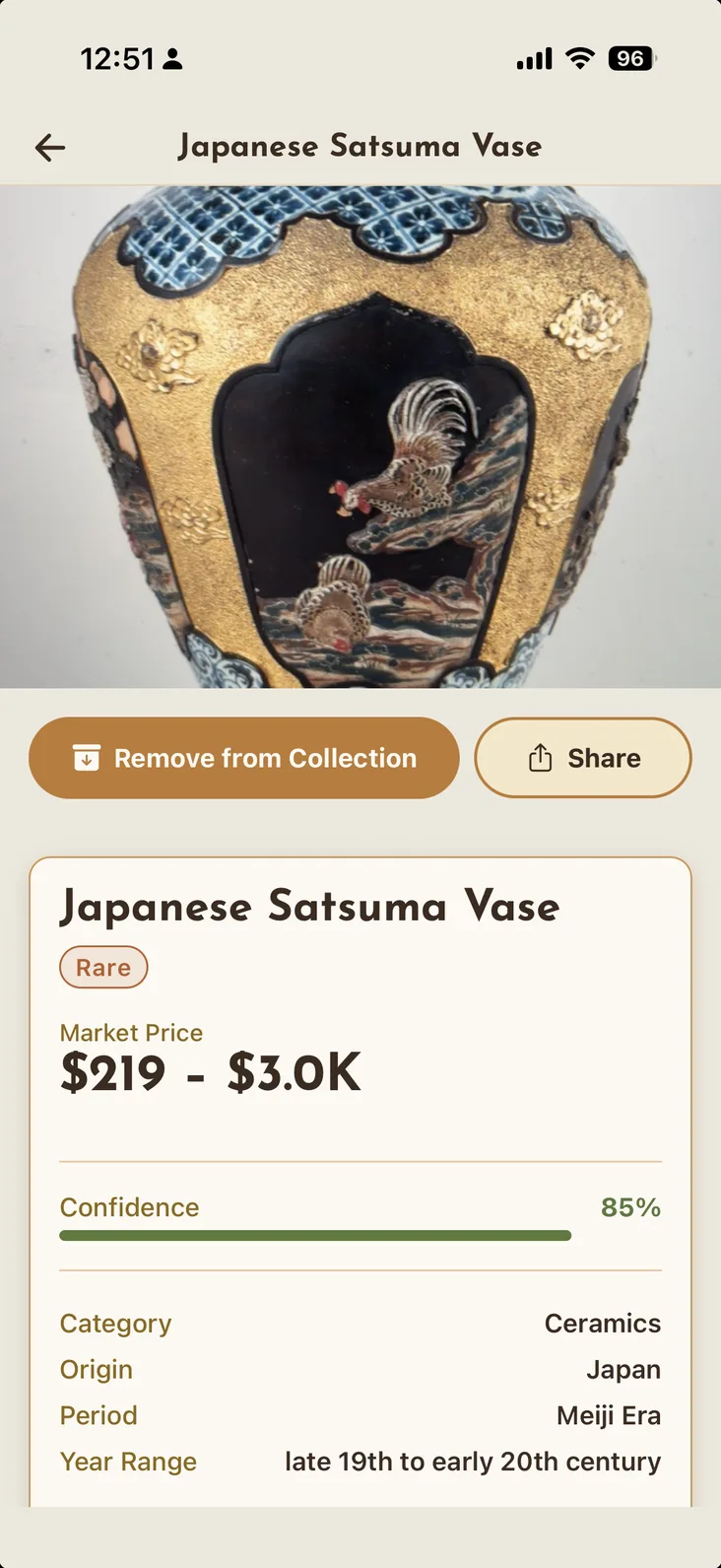
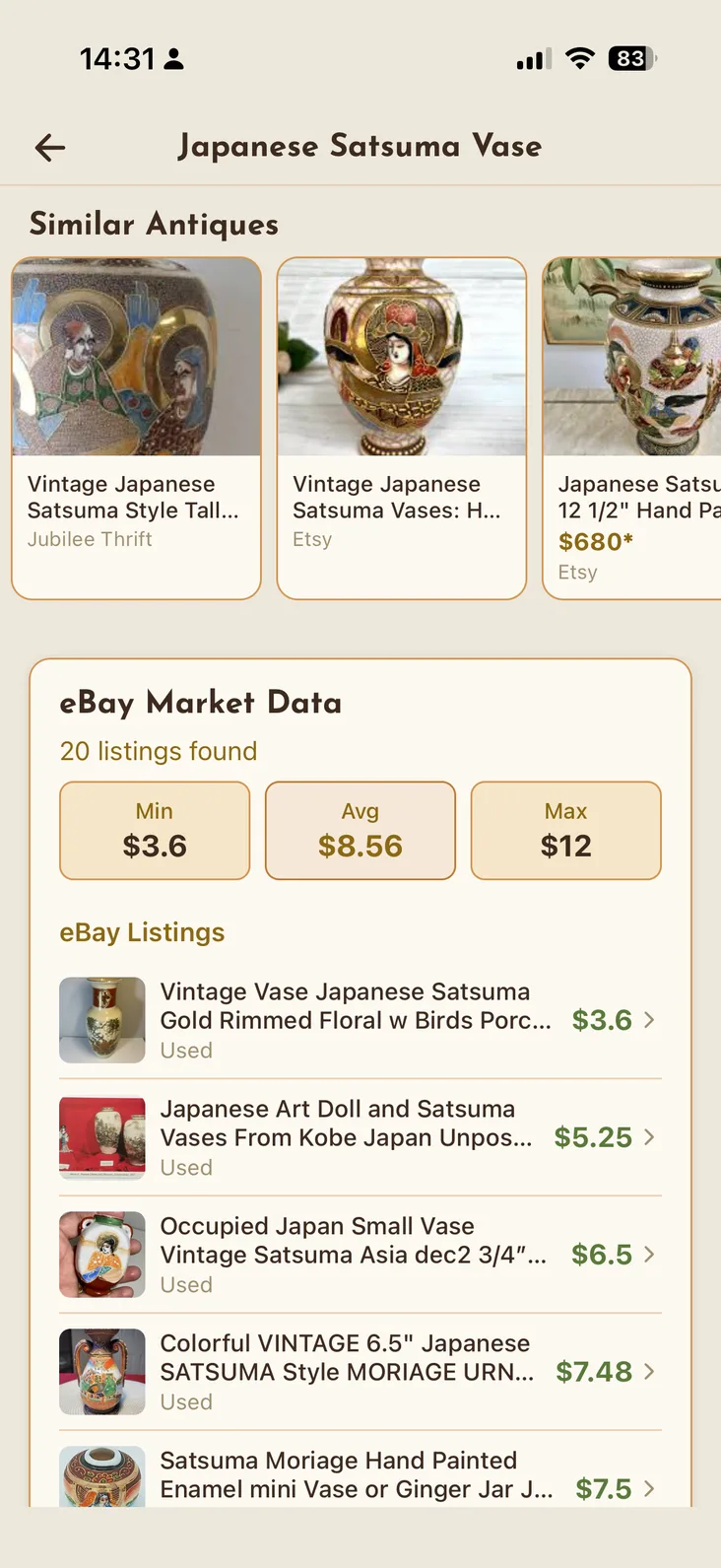
Values in Antique Snap are AI-generated estimates, not certified appraisals, based on similar items listed for sale at the time of the search. They're not offers to buy or sell. For insurance, probate or a sale, consult a qualified appraiser. Our antique value app guide explains how these ranges are built.
Curio - Antique Identifier
Dionysus Labs, LLC · App Store since July 2024 · also on Google Play
Curio tells you what the item is, who made it, where it's from and roughly when, plus its history. Its price range is based on what similar pieces are on the market for, and a Visual Matches section shows similar items from across the web, with photos you can open.
If you spot a maker's mark, signature or pattern name, you can add it and Curio updates the estimate. Collections export as a PDF, handy for a home inventory. Your first scans are free, and signing in is optional (it backs up your collection).
Downside: the listing doesn't say how many free scans you get or mention a confidence score. Like Antique Snap, its range comes from pieces for sale rather than completed sales.
Good fit: people clearing a house who want a PDF to share, and anyone who can already read the mark and wants to add it.
Antique Identifier - Relic
Sans Software, LLC · App Store since June 2025 · no Android version found
Relic turns one photo into a fact sheet with the name, origin, era, materials, condition, a value range in US dollars and a short history note. The listing says it searches the web for similar items and real previous sales, which helps with pricing, but it doesn't say whether you see those results. Scans stay on your phone, where you can filter them by keyword, value or period.
Downside: you can't run a single scan without starting a subscription. The listing says identification, history, comparisons and collections all need one. It's also made for iPhone only, with no Android version.
Good fit: dealers, pickers and online sellers who price stock every day and are happy to subscribe from the start.
Antique Identifier Zophi
326 LAB - FZCO · App Store since June 2025 · also on Google Play
Zophi gives you an identification, an estimated value and the story behind the item. Collections export as PDF or CSV (a file that opens in a spreadsheet), and you can share an item as a link. The Android listing adds editing results, setting your own selling prices and a feed for sharing finds. Paid plans are weekly or yearly.
Downside: you can't tell from the listing where the values come from or how much you get before paying, so test it on a piece you know first.
Good fit: sellers who want their stock in a spreadsheet, and collectors who enjoy sharing finds.
Checking an antique without a dedicated app
Google Lens and eBay's sold listings are free and get you most of the way, with more work. WorthPoint goes further back, for a fee.
Google Lens
Lens is free in the Google app on iPhone and Android, and in Chrome and Google Photos. Point the camera at an object and it shows similar images and web pages, which is good for naming common things and finding words to search with.
Downside: Lens isn't built to appraise. It doesn't give you a value range based on sales, and many shopping matches are new copies, so a match doesn't tell you how old your piece is.
eBay sold listings and WorthPoint
Once you know what it is, look at what similar pieces actually sold for. On eBay, search for the item and filter for Sold items. It's free and shows what buyers paid, but only for the last few months. WorthPoint archives auction and sale prices going back years, but you need a paid membership to see them.
Our guide to what your antique is worth walks through it, and the five-step identification method covers marks, materials and style.
Test any app in five minutes
The best accuracy test is your own, during the free scans, on a piece you already know.
- Pick something you know, like a signed plate or marked silver whose maker and age you're sure of.
- Photograph it in daylight on a plain background, then take a second photo of the mark.
- Check the answer. Did it get the maker and period right, and did the mark photo sharpen the result?
- Look behind the value. If the app shows listings, open a few and compare them with your piece.
- Compare with sold prices. If the app's range sits far above every eBay sale, treat its numbers as a starting point.
Our guide to what an identifier app should check has more questions to ask, and the accuracy page explains what Antique Snap's confidence score measures.
Try it on something you already know.
See what it is, roughly when it was made and an estimated value range, with the listings behind it. Your first three identifications are free, with no account.
Frequently asked questions
Google Lens is free, but it isn't built to date or value a piece. Of the dedicated apps, Antique Snap gives three full identifications free, Curio lets you try your first scans, and Relic needs a subscription from the start. Our free antique identification app guide explains what a free scan includes.
We couldn't find a fair head-to-head test, and the photo matters as much as the app. A sharp shot of a marked base helps all of them. Test an app during its free scans on a piece you already know. Antique Snap shows a confidence score, so you can see when it's unsure. Our accuracy page explains what that score measures.
Often it can name the object and find similar ones online, which gives you words to search with. It isn't built to date or value a piece, and many shopping matches are modern copies. Use it as a first step, then check the marks and sold prices yourself. Our five-step identification method covers the rest.
No. Apps give estimates, not certified appraisals, based on similar items online, which is enough to decide what deserves a closer look. For insurance, probate or a big sale, use a qualified appraiser, which usually costs $50 to $200 per item. Our antique value app guide explains how app values are built and where they go wrong.
No. AntiqSnap is made by Next Vision Limited. Antique Snap: Value Identifier, listed on Google Play as Antique Identifier & Value, is made by Vukasin Zurzevic and is the app this site is about. They're separate apps with separate subscriptions. Our help page shows how to tell which one you have.
Know what it is before you decide.
Free to try · No account needed · Cancel anytime


On your computer? Scan with your phone camera to get the app.